Math syntax
This page provides an overview of the syntax available to formulate math components. Using the math syntax, you can populate an N-dimensional matrix with math expressions. You use foreach to define the dimensions of the matrix. You use the top-level where string to subset the matrix to only elements of interest. You then populate the subset with any number of equation expressions, each further subsetting the matrix.
See also
Reference for the allowed key-value pairs in your additional math YAML file is available in the reference section of the documentation.
foreach lists
If the math component is indexed over dimensions (a.k.a. "sets" - e.g., techs, nodes, timesteps), then you need to define a foreach list of those sets.
If the component is dimensionless, no foreach list needs to be defined.
For example, foreach: [nodes, techs] will build the component over all nodes and techs in the model.
The available dimensions in Calliope are: nodes, techs, carriers, costs, timesteps.
If using time clustering and inter-cluster storage math, there is also a datesteps set available.
If you want to build over your own custom dimension, you will need to add it to the Calliope model dataset before building the optimisation problem, e.g. as a new indexed parameter.
where strings
Where strings allow you to define math that applies to only a subset of your data or of the models you are running.
They are made up of a series of statements combined with logical operators.
These statements can be one of the following:
-
Checking the existence of set items in an input parameter. When checking the existence of an input parameter it is possible to first sum it over one or more of its dimensions; if at least one value on the summed dimension(s) is defined, then it will be considered defined in the remaining dimensions.
Examples
- If you want to apply a constraint across all
nodesandtechs, but only for node+tech combinations where theflow_out_effparameter has been defined, you would includeflow_out_eff. - If you want to apply a constraint over
techsandtimesteps, but only for combinations where thesource_use_maxparameter has at least onenodewith a value defined, you would includeany(resource, over=nodes). (1)
anyis a helper function!
- If you want to apply a constraint across all
-
Checking the value of a configuration option or an input parameter. Checks can use any of the operators:
>,<,==,<=,>=. Configuration options are any that are defined inconfig.build, where you can define your own options to access in thewherestring.Examples
- If you want to apply a constraint only if the configuration option
config.build.modeis operate, you would includeconfig.mode==operate. - If you want to apply a constraint across all
nodesandtechs, but only where theflow_effparameter is less than 0.5, you would includeflow_eff<0.5. - If you want to apply a constraint only for the first timestep in your timeseries, you would include
timesteps==get_val_at_index(dim=timesteps, idx=0). (1) - If you want to apply a constraint only for the last timestep in your timeseries, you would include
timesteps==get_val_at_index(dim=timesteps, idx=-1).
get_val_at_indexis a helper function!
- If you want to apply a constraint only if the configuration option
-
Checking the
base_techof a technology (storage,supply, etc.).Examples
- If you want to create a decision variable across only
storagetechnologies, you would includebase_tech==storage.
- If you want to create a decision variable across only
-
Subsetting a set. The sets available to subset are always [
nodes,techs,carriers] + any additional sets defined by you inforeach.Examples
- If you want to filter
nodeswhere any of a set oftechsare defined:defined(techs=[tech1, tech2], within=nodes, how=any)(1).
definedis a helper function!
- If you want to filter
To combine statements you can use the operators and/or.
You can also use the not operator to negate any of the statements.
These operators are case insensitive, so "and", "And", "AND" are equivalent.
You can group statements together using the () brackets.
These statements will be combined first.
Examples
- If you want to apply a constraint for
storagetechnologies if the configuration optioncyclic_storageis activated and it is the last timestep of the series:base_tech=storage and cyclic_storage==True and timesteps==get_val_at_index(dim=timesteps, idx=-1). - If you want to create a decision variable for the input carriers of conversion technologies:
carrier_in and base_tech==conversion - If you want to apply a constraint if the parameter
source_unitisenergy_per_areaor the parameterarea_use_per_flow_capis defined:source_unit==energy_per_area or area_use_per_flow_cap. - If you want to apply a constraint if the parameter
flow_out_effis less than or equal to 0.5 andsource_usehas been defined, orflow_out_effis greater than 0.9 andsource_usehas not been defined:(flow_out_eff<=0.5 and source_use) or (flow_out_eff>0.9 and not source_use).
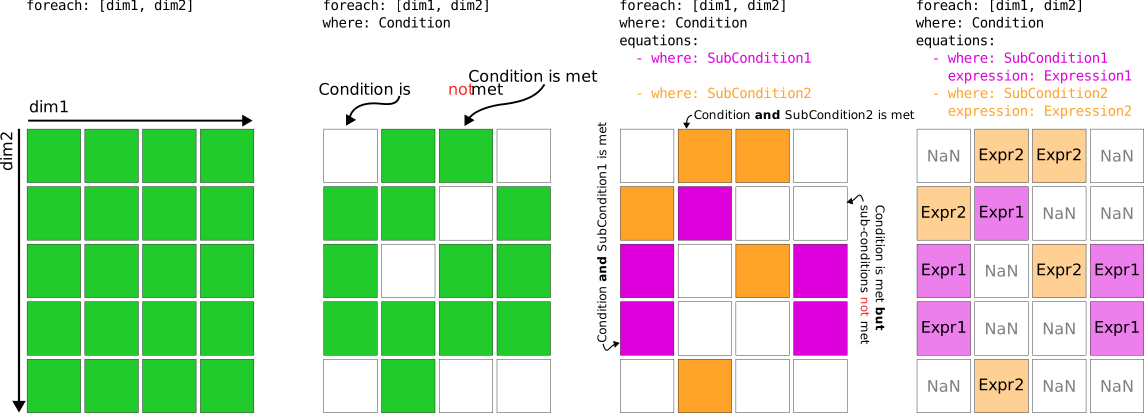
Combining foreach and where will create an n-dimensional boolean array.
Wherever index items in this array are True, your component expression(s) will be applied.
expression strings
As with where strings, expression strings are a series of math terms combined with operators. The terms can be input parameters, decision variables, global expressions, or numeric values that you define on-the-fly.
If you are defining a global expression or objective, then the available expression string operators are: +, -, *, /, and ** ("to the power of").
These expressions are applied using standard operator precedence (BODMAS/PEMDAS, see this wiki for more info).
If you are defining a constraint, then you also need to define a comparison operator: <=, >=, or ==.
Examples
- If you want to limit all technology outflow to be less than 200 units:
flow_out <= 200. - If you want to create a global expression which is the storage level minus a parameter defining a minimum allowed storage level:
storage - storage_cap * min_storage_level. - If you want to set the outflow of a specific technology
my_techto equal all outflows of a specific carriermy_carrierat each node:flow_out[techs=my_tech] == sum(flow_out[carriers=my_carrier], over=techs). - If you want inflows at a node
my_nodeto be at least as much as the inflows in the previous timestep:flow_in[nodes=my_node] >= roll(flow_in[nodes=my_node], timesteps=1).
Slicing data
You do not need to define the sets of math components in expressions, unless you are actively "slicing" them.
Behind the scenes, we will make sure that every relevant element of the defined foreach sets are matched together when applying the expression (we merge the underlying xarray DataArrays).
Slicing math components involves appending the component with square brackets that contain the slices, e.g. flow_out[carriers=electricity, nodes=[A, B]] will slice the flow_out decision variable to focus on electricity in its carriers dimension and only has two nodes (A and B) on its nodes dimension.
To find out what dimensions you can slice a component on, see your input data (model.inputs) for parameters and the definition for decision variables in your math dictionary.
equations
Equations are combinations of expression strings and where strings.
You define one or more equations for your model components.
A different where string associated with each equation expression allows you to slightly alter the expression for different component members.
You define equations as lists of dictionaries:
If you are supplying only one equation, you do not need to define a where string:
Note
where strings within equations are appended to your top-level where string, e.g.:
Examples
- Divide by efficiency if efficiency is larger than zero, otherwise set the variable to zero:
equations:
  - where: flow_eff > 0
    expression: flow_out / flow_out_eff == flow_in
  - where: flow_eff == 0
    expression: flow_out == 0
- Limit flow by storage_cap, if it is defined, otherwise by flow_cap:
Warning
You have to be careful when setting up different where strings to avoid clashes, where different expressions are valid for the same component member.
We will raise errors when this happens, and if your where strings become too restrictive and so miss a component member that needs an expression.
sub-expressions
For long expressions - or those where a part of the expression might change for different component members according to a specific condition - you can define sub-expressions.
These look similar to equations; they are lists of dictionaries with where and expression strings.
They are accessed from you main expression(s) by reference to their name prepended with the special $ character.
For example:
equations:
  - expression: flow_out <= $adjusted_flow_in
sub_expressions:
  adjusted_flow_in:
    - where: base_tech==storage
      # main expression becomes `flow_out <= flow_in * flow_eff`
      expression: flow_in * flow_eff
    - where: base_tech==supply
      # main expression becomes `flow_out <= flow_in * flow_eff * parasitic_eff`
      expression: flow_in * flow_eff * parasitic_eff
    - where: base_tech==conversion
      # main expression becomes `flow_out <= flow_in * flow_eff * 0.3`
      expression: flow_in * flow_eff * 0.3
Note
As with equations, where strings are mixed in together.
If you have two equation expressions and three sub-expressions, each with two expressions, you will end up with 2 * 3 * 2 = 12 unique where strings with linked expression strings.
slices
Similarly to sub-expressions, you can use references when slicing your data, again using the $ identifier.
Standard slicing only allows for dimensions to reference plain strings or lists of plain strings.
If you want to slice using a lookup table, you will need to provide it within the slices sub-key, e.g.:
If you define a lookup "lookup_techs" as:
Then the following slice will select only the tech_1 and tech_2 members of flow_out:
equations:
  - expression: sum(flow_out[carriers=electricity, techs=$tech_ref]) <= flow_in[carriers=heat] * 0.6
slices:
  tech_ref:
    - expression: lookup_techs
default
Variables and global expressions can take default values.
These values will be used to fill empty array elements (i.e., those that are not captured in the where string) when conducting math operations.
A default value is not required, but is a useful way to ensure you do not accidentally find yourself with empty array elements creeping into the constraints.
These manifest as NaN values in the optimisation problem, which will cause an error when the problem is sent to the solver.